What is data modeling? Learn its importance and explore the three main types of data models to improve data governance and architecture.
This article is designed as the foundational reference in our data modeling series. It defines core concepts, clarifies terminology, and equips you with the foundational understanding needed to explore deeper aspects of data modeling and its practical applications.
Picture a world where every data manager and user speaks a different data dialect. Chaos reigns. Ambiguity, inefficiency, and miscommunication stifle operations, alignment, and the decisions that drive growth.
Data modeling adds clarity and a unified language to data work and analysis by creating blueprints that illustrate data structures and connections. In this reference guide, we explain why data modeling is worth the effort and how to implement it at the conceptual, logical, and physical levels.
What is data modeling?
Data modeling is the process of creating a visual representation of data structures, their relationships, attributes, and the rules within an information system. It is essentially a blueprint for how corporate data is used and mapped to the real world.
Its purpose is to:
-
Facilitate understanding, communication, organization, standardization and management of data;
-
Guide and enable data integration, data storage, retrieval, and use;
-
Ensure business processes, applications, and software run with optimally formatted data.
Benefits in an enterprise context:
-
Comprehend complex datasets and interconnections;
-
Build efficient, business-aligned databases and platforms;
-
Increase scalability, adaptability, and maintainability;
-
Support governance, quality, and compliance;
-
Improve collaboration between business and technical teams.
Data model types and examples
Data modeling can be done at different levels, each serving a distinct purpose. The three most common types are:
- Conceptual data model;
- Logical data model;
- Physical data model.
Traditionally, modeling is top-down: starting from the conceptual model, then the logical model, and finally the physical model implementation in the target database or data warehouse.
Conceptual data model
Conceptual data modeling is a broadly defined and used concept with several interpretations. Nevertheless, the main purpose of a conceptual data model is to identify and define relevant business concepts and their relationships. This fosters a shared understanding for stakeholders from business to technical.
This represents the highest level of data modeling, and shouldn’t dive into too much detail. For the same reason, a conceptual data model should be independent of technology and application.
Zooming out from the details and looking at the bigger picture helps you see the related concepts in your focus area. This gives you a better understanding of what you need to take into consideration when building your application or analytics solution on top of certain data.
Usually, conceptual modeling starts by identifying the relevant concepts and how those concepts relate and interact with each other. It is good practice to describe the concepts (and the relationships as well) with a couple of sentences to make sure you have a mutual understanding of what you are trying to model.
Conceptual data model example
Let’s say you need a conceptual data model for your library system. The data model should describe the key entities, attributes, and relations within the system. Here’s what it could look like in simple terms:

Entities
Example (Library System):
- Book — a physical or electronic written work by one or more authors
- Author — creator of the written content
- Book-Author relationship — a book can have multiple authors, and an author can write multiple books
When applied for analytical purposes, conceptual data modeling focuses on understanding and identifying the business terminology and concepts, and how they relate to the domain in scope. Unlike designing operational business applications, the data for these concepts often already exists. During the conceptual modeling process, you may enrich the model with additional information such as synonyms, locations, source systems, and quality traits of the available data.
It is also a good practice to link the conceptual model to existing business glossaries or taxonomies. This metadata can feed into a data catalog, providing a centralized view of available data assets, their characteristics, and how they can be used for analytical purposes
Best Practices:
-
Start by identifying relevant concepts and how they relate;
-
Describe each concept and relationship in plain language;
-
Link to glossaries/taxonomies for consistent terminology;
-
Enrich the model with contextual metadata like synonyms, source systems, and data quality traits.
Want to dive deeper into how different approaches influence your modeling work?
Check out our guide on how to choose the right data modeling approach. It explores practical design strategies like Inmon, Kimball, and Data Vault and helps you decide which fits your organization best.
Logical data model
The logical data model builds on the conceptual model by adding more detail and precision. It’s purpose is to define a data model for a data solution that is being built - so something that solves a business requirement. It refines relationships, ensures uniqueness, and prepares data for accurate mapping without tying it to a specific technology. It should capture how to store and organize all relevant and essential domain data without losing information, reflecting the business’ detailed understanding of the data. Query performance and storage optimization are left to the physical model.
Key aspects include:
- Resolving many-to-many relationships with intermediate tables;
- Defining natural or unique keys and references;
- Excluding surrogate keys, data types, and indexes;
- Using business-friendly language for attributes and relationships.
Example (Library System):
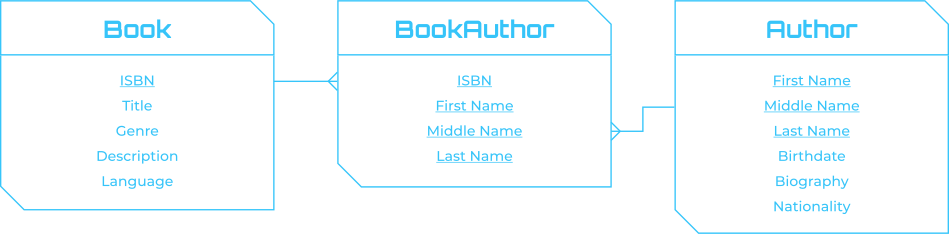
In practice, a logical data model for a library system makes relationships and keys explicit while keeping the model technology-agnostic. Here’s what that could look like:
- Book: ISBN, Title, Genre, Description, Language;
- BookAuthor: ISBN, First Name, Middle Name, Last Name;
- Author: First Name, Middle Name, Last Name, Birthdate, Biography, Nationality.
Logical data modeling is often overlooked but is critical in the analytical landscape. A well-defined logical model that is based on business requirements brings several important benefits. It not only refines the conceptual model but also acts as a practical step toward implementation while keeping technology independence intact.
Benefits include:
- Makes it easier to map data to sources;
- Validates transformation logic for data pipelines;
- Acts as part of requirement definition;
- Builds trust between stakeholders;
- Can be normalized or de-normalized depending on the use case.
Logical Data Model Example (Library System):
Continuing with the library example, a logical data model could clarify data structures and associations more explicitly. For instance:
Attributes for the Book entity:
- ISBN — Natural unique identifier for a book;
- Title;
- Genre;
- Description;
- Language.
Attributes for the BookAuthor entity (all attributes together guarantee uniqueness for individual tuples/rows):
- ISBN;
- First Name;
- Middle Name;
- Last Name.
Attributes for the Author entity:
- First Name;
- Middle Name;
- Last Name;
- Birthdate;
- Biography;
- Nationality.
Keys and cardinalities:
The logical data model only contains natural keys. A natural key can be a combination of multiple attributes, like in the Author table shown above. Many-to-many relationships are resolved by deriving additional “bridge” tables based on the combination of natural keys of entities in the relationship.
This logical data model further refines the conceptual model by adding specific attributes and defining relationships with keys. Depending on requirements, it might also include normalization or de-normalization. The goal is to provide a more detailed view of how entities relate to each other and the attributes associated with each entity, guiding the implementation phase while remaining independent of any specific database technology.
Logical modeling lays the foundation, but many teams are exploring whether automation can speed up this step. Our article “Does automation in data modeling make sense?” looks at when automation supports modeling and where human expertise is still critical.
Physical data model
In the final phase, the logical data model is transformed into a physical data model by defining data types and adding technical attributes like surrogate keys, constraints, and indices. The physical data model specifies how data is stored and accessed in a specific database system, and requires knowledge of the DBMS’ indexing, compression, and distribution options.
The purpose is to store data in a robust manner that enables high performance and takes into account the technical details of the chosen technology. Well-defined data types can significantly impact query performance and optimize computing and storage costs.
In analytics, physical modeling often deals with downstream data that already exists with predefined schemas. These should not be lost in integration to a data platform or warehouse but leveraged, bringing in correct data types and metadata.
Keep in mind that physical data modeling is technology-specific. You must understand indexing, compression, and performance trade-offs of your DBMS, as well as data distribution strategies. Flowing data through different warehouse layers may also require mastering modeling methodologies like Data Vault or star schema.
Physical Data Model Example (Library System):
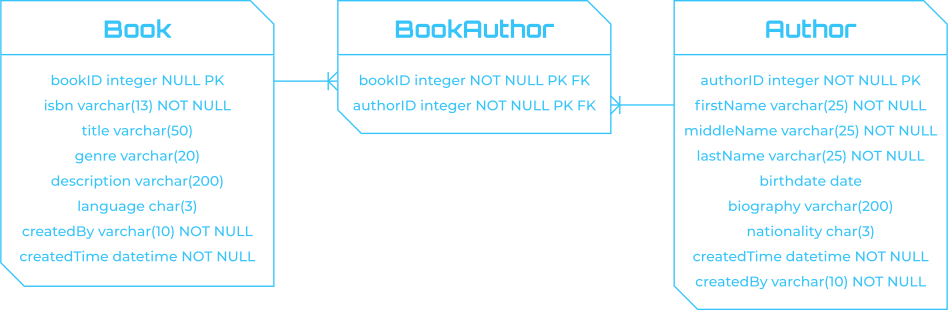
At this point, we want to see the data flow into the right places, adhering to the structures defined in conceptual and logical models. Physical modeling must be tailored to a specific database. For example, in a relational DB:
Constraints and indices
- Primary keys and foreign keys: Defined to ensure data integrity and enforce relationships;
- Indices: Created on frequently queried columns for faster retrieval. Additional indices may be added based on query patterns, but remember they impact write performance and storage.
Data Types
- Use of specific types such as INTEGER, VARCHAR, DATE, based on DBMS requirements and best practices.
Note: Column-oriented databases for analytics rarely enforce constraints. Responsibility for integrity shifts to the engineer. Indexing also differs compared to row databases, making it essential to understand the chosen technology.
This physical model provides a detailed blueprint for database implementation, specifying tables, columns, types, constraints, and indexes to translate the logical model into a technical schema.
Physical modeling becomes even more powerful when combined with real-time data flows. Learn more in our blog on data ingestion and data modeling for business real-time processing.
Recap: Conceptual vs. Logical vs. Physical
That’s a lot to digest. Here’s a quick recap of how the models differ:
- Conceptual model: High-level concepts and relationships; business requirements without technical detail; creates shared understanding;
- Logical model: Adds more detail to the conceptual; defines entities, attributes, relationships, and keys; remains technology-independent;
- Physical model: Translates logical into technical specs; specifies types, constraints, DB-specific details; ready for implementation.
Requirements for Data Modeling Tools
Data modeling should be collaborative. A common reason for failure is building models in isolation from domain experts. Communication ensures shared understanding. Iteration is equally important: models should evolve as people, business, and language change.
Key features of effective tools:
- Ease of use with intuitive interfaces;
- Compatibility with multiple DB platforms;
- Reverse/forward engineering support;
- Version control for collaboration;
- Data lineage tracking;
- Metadata management.
There are many dedicated tools, but often it’s smart to consider broader systems that reduce complexity. One option is a DataOps platform like Agile Data Engine, which supports much more than just data modeling.
Choosing tools is only part of the story. If data protection is top of mind, explore our perspective on data modeling for data protection to see how modeling safeguards compliance and governance.
Conclusion: Why Focus on Data Modeling?
Putting effort into data modeling helps capture essential domain information precisely. Valid, up-to-date models create trust, ensure delivery of correct data, and enable efficient use across applications. They also support governance and compliance, such as GDPR.
Finally, if you’re still wondering whether data modeling is worth the effort in today’s cloud landscape, read our take: Is data modeling relevant in a modern cloud data warehouse?. Spoiler: it absolutely is — but not always in the way you think.
For those ready to take the next step, we’ve also created a guide to Choosing the right data modeling approach.
Watch the video below to see Agile Data Engine’s data modeling in action.